


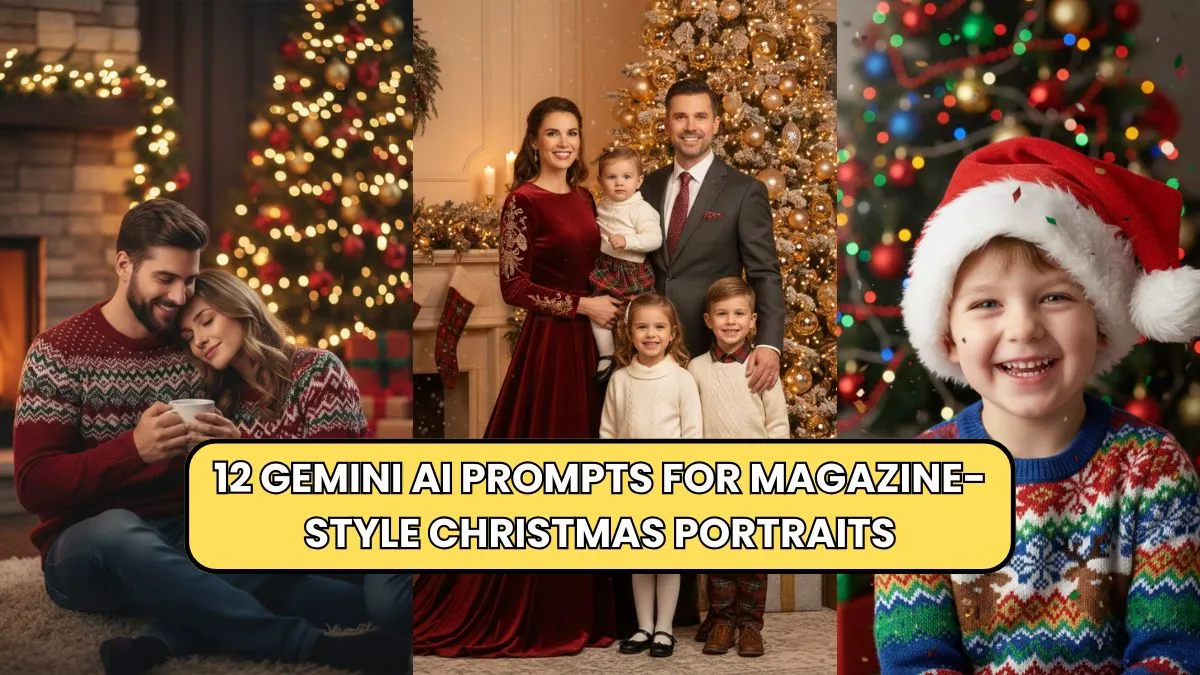
Creating professional-looking Christmas portraits can feel overwhelming, but Gemini AI has made it remarkably simple. With AI-powered creativity, photographers and designers can achieve magazine-quality results quickly. Using the right prompts is key to maximizing the potential of Gemini AI.
In this guide, we’ll explore 12 Gemini AI prompts for magazine-style Christmas portraits that balance festive aesthetics, lighting, and style, giving your images a polished, professional touch. Whether you’re shooting for social media, holiday cards, or magazine features, these prompts offer inspiration and actionable insights for photographers of all levels.
Why Gemini AI is Ideal for Christmas Portraits

Gemini AI allows creators to generate highly detailed, visually striking portraits with minimal effort. Its advanced algorithms can handle lighting, composition, textures, and even stylistic elements to match the magazine aesthetic. Unlike traditional editing, Gemini AI streamlines the creative process, letting you focus on vision rather than technicalities.
For Christmas portraits, this means achieving festive warmth, perfect color balance, and engaging compositions effortlessly. Using focused AI prompts, you can customize every aspect, from clothing styles to holiday props, creating unique images that resonate with viewers.
12 Gemini AI Prompts for Stunning Christmas Portraits
Here are the top 12 Gemini AI prompts, crafted for magazine-quality results. You can copy these directly into Gemini AI or adapt them for your specific style.
| Prompt Number | Gemini AI Prompt | Result Focus |
|---|---|---|
| 1 | “Elegant family portrait in Christmas attire, soft warm lighting, cinematic depth, magazine-quality, festive background, natural smiles” | Classic family style |
| 2 | “Cozy couple by fireplace, Christmas sweaters, bokeh lights, glossy magazine finish, soft shadows, intimate composition” | Romantic & cozy |
| 3 | “Stylish child portrait with Santa hat, vibrant colors, playful expressions, editorial lighting, holiday decorations” | Fun & energetic |
| 4 | “Minimalist Christmas portrait, neutral tones, subtle decorations, artistic depth, glossy magazine effect” | Modern & sleek |
| 5 | “Pet portraits in holiday theme, realistic fur texture, studio lighting, festive accessories, professional magazine quality” | Pet-friendly style |
| 6 | “Candid friends portrait outdoors, snowflakes falling, warm jackets, cinematic depth, joyful holiday vibe” | Outdoor candid |
| 7 | “Elegant solo portrait, Christmas evening background, golden hour lighting, editorial glamour style” | Glamorous & professional |
| 8 | “Creative flat lay with Christmas props, soft shadows, vibrant colors, editorial photography composition” | Lifestyle & product focus |
| 9 | “Winter wonderland portrait, children playing in snow, soft cinematic lighting, magazine-quality storytelling” | Narrative-focused |
| 10 | “Classic holiday couple portrait, Christmas lights, reflective surfaces, warm soft shadows, high-fashion style” | Editorial fashion |
| 11 | “Family baking cookies, festive kitchen scene, warm tones, magazine-style storytelling, natural expressions” | Lifestyle storytelling |
| 12 | “High-contrast Christmas portrait, bold colors, dramatic lighting, editorial magazine aesthetic, festive attire” | Artistic & dramatic |
Tips for Using Gemini AI Prompts Effectively
- Customize for Your Subject: Adjust clothing styles, age, and props to match the model.
- Adjust Lighting Settings: Gemini AI allows you to modify lighting, which is crucial for capturing warm Christmas tones.
- Experiment with Angles: Slight changes in camera angle can give portraits more magazine flair.
- Combine Prompts: Merge two or more prompts for creative variations, like family + winter outdoor scene.
- Post-Editing Enhancements: Minimal touch-ups in photo editors can enhance colors or contrast for a more polished finish.
Suggested Layout Table for Prompt Variations
| Prompt Variation | Recommended Style | Notes |
|---|---|---|
| Family + Cozy Indoor | Warm tones, fireplace | Add personal holiday items |
| Solo + Glamour | Golden hour lighting | Magazine cover style |
| Pet + Playful | Vibrant colors, festive hats | Ensure natural pose |
| Candid Outdoors | Snow or lights background | Use soft bokeh effect |
Actionable Creative Ideas
- Theme Variations: Try themes like “Retro Christmas,” “Nordic Winter,” or “Luxury Holiday” for magazine-style uniqueness.
- Background Settings: Snow, fireplaces, decorated trees, city lights—all can be specified in prompts.
- Color Palette Tips: Focus on reds, golds, whites, and green accents for traditional festive vibes.
- Props & Accessories: Santa hats, gifts, lights, ribbons, and cookies make images more engaging.
- Interactive Sessions: Take multiple AI renders and let clients or family members pick favorites for a personal touch.
Conclusion
Using 12 Gemini AI prompts for magazine-style Christmas portraits, photographers and designers can effortlessly achieve professional-quality results. These prompts save time, inspire creativity, and produce festive images that shine in both social media feeds and magazine spreads.
By customizing, combining, and experimenting with lighting, props, and angles, you can ensure every portrait is unique and captivating. Whether creating family memories, marketing visuals, or seasonal content, Gemini AI provides the tools for stunning, magazine-ready results this holiday season. Start using these prompts today and transform your Christmas portraits into professional, eye-catching works of art.