
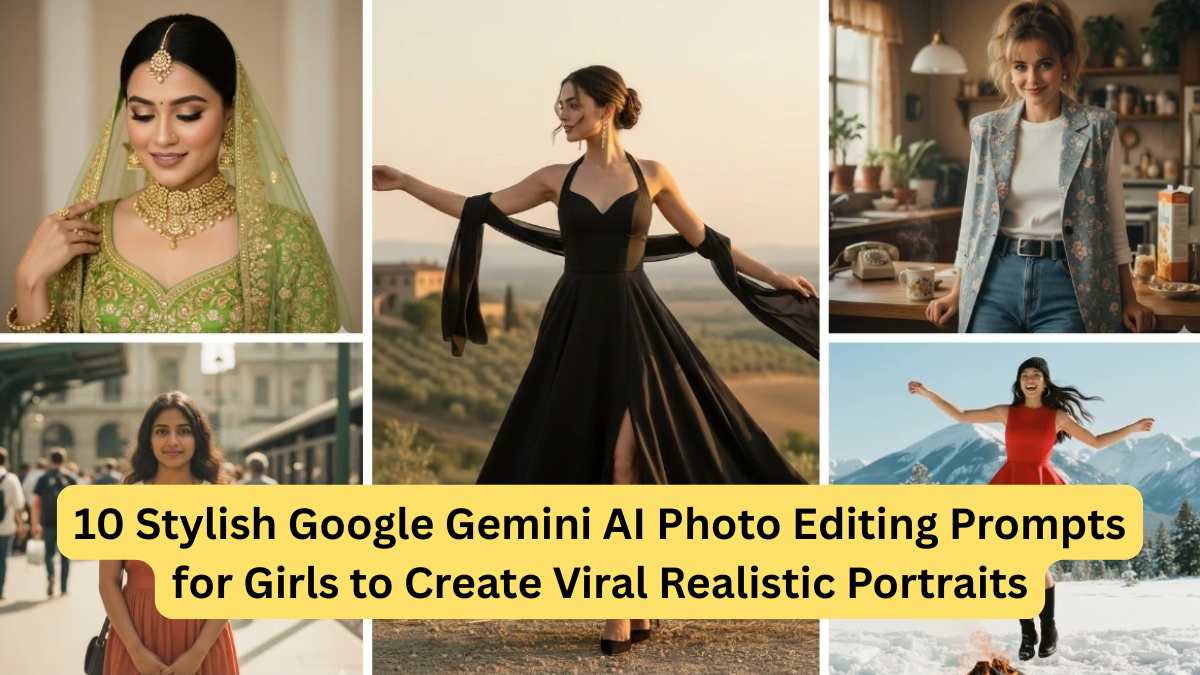
In the era of artificial intelligence, photo editing has evolved far beyond traditional filters and presets. AI tools like Google Gemini have completely transformed how portraits are edited, enhanced, and stylized. For girls who love fashion, aesthetics, social media creativity, and realistic digital portraits, AI prompts are now the secret weapon to creating viral-quality images.
Whether you’re a content creator, Instagram influencer, student, or simply someone who loves experimenting with visuals, using the right AI prompt can turn a normal photo into a professional, studio-like portrait within seconds.
In this detailed guide, you’ll discover 10 stylish Google Gemini AI photo editing prompts for girls, carefully crafted to generate realistic, elegant, and viral-ready portraits. Each prompt is designed to enhance natural beauty, lighting, expressions, outfits, and backgrounds—without looking fake or over-edited.
This article also explains how to use these prompts, tips for better results, and includes a ready-to-use table for quick reference.
Why Google Gemini AI Prompts Matter for Photo Editing
AI doesn’t guess—it follows instructions. That’s why prompts play a crucial role.
A strong AI prompt tells Google Gemini:
- How the subject should look
- What lighting style to use
- Facial expressions and mood
- Outfit and colors
- Background depth and realism
Without a proper prompt, results may look artificial or dull. With a smart prompt, your photo can look like it was clicked using a DSLR camera in a professional studio.
Benefits of Using Google Gemini AI for Girls’ Portrait Editing
- Enhances natural skin texture without over-smoothing
- Creates realistic lighting and shadows
- Improves facial symmetry naturally
- Adds stylish outfits and backgrounds
- Ideal for Instagram, reels, profile photos, and thumbnails
- No professional editing skills required
How to Use These Google Gemini AI Prompts
- Upload your original photo to Google Gemini
- Copy the prompt exactly as written
- Paste it into the prompt box
- Generate and fine-tune if needed
- Download and share
👉 Tip: Use clear, front-facing images for best results.
Table: Overview of AI Portrait Styles
| Prompt No. | Style Name | Mood | Best For |
|---|---|---|---|
| 1 | Soft Glam Portrait | Elegant & Natural | Instagram DP |
| 2 | Sunlight Outdoor Look | Fresh & Bright | Reels & Stories |
| 3 | Minimal Studio Look | Clean & Professional | Profile Photos |
| 4 | Traditional Indian Look | Graceful | Festive Posts |
| 5 | Korean Aesthetic | Soft & Trendy | Fashion Content |
| 6 | Black Dress Editorial | Bold & Confident | Viral Reels |
| 7 | Cozy Winter Portrait | Warm & Calm | Seasonal Posts |
| 8 | Casual Street Style | Modern | Lifestyle Blogs |
| 9 | Vintage Film Look | Artistic | Creative Feeds |
| 10 | Natural Beauty Close-up | Realistic | Personal Branding |
1. Soft Glam Realistic Portrait Prompt
Prompt:
“Enhance this photo into a soft glam realistic portrait of a young girl with natural skin texture, smooth lighting, subtle makeup, glossy lips, well-defined eyes, and realistic facial details. Use professional studio lighting with soft shadows, DSLR quality, shallow depth of field, and a clean neutral background. Maintain natural beauty without over-editing.”
Why it works:
This prompt keeps the face realistic while enhancing elegance—perfect for profile pictures and Instagram feeds.
2. Sunlight Outdoor Portrait Prompt
Prompt:
“Edit this image to look like a natural outdoor portrait taken during golden hour sunlight. Soft sun rays falling on the face, realistic skin tones, gentle shadows, fresh expression, slightly blurred background with greenery, high-resolution DSLR quality, and natural beauty preserved.”
Best use:
Lifestyle reels, travel posts, and summer photos.
3. Minimal Studio Aesthetic Prompt
Prompt:
“Transform this image into a minimal studio-style portrait with clean lighting, neutral tones, soft shadows, sharp focus on facial features, realistic skin texture, simple outfit styling, professional camera quality, and an elegant modern look.”
Why girls love it:
Perfect for LinkedIn, portfolios, and clean aesthetic feeds.
4. Traditional Indian Look Prompt
Prompt:
“Create a realistic traditional Indian portrait with elegant ethnic attire, soft warm lighting, natural makeup, expressive eyes, detailed fabric texture, subtle jewelry, cinematic background blur, DSLR-quality clarity, and graceful facial expressions.”
Best for:
Festivals, cultural posts, and family portraits.
5. Korean-Inspired Soft Aesthetic Prompt
Prompt:
“Edit this portrait in a Korean aesthetic style with soft pastel tones, smooth but realistic skin texture, natural blush, glossy lips, gentle lighting, cute yet elegant expression, minimal background, and high-definition camera quality.”
Trending factor:
Extremely popular on Instagram and Pinterest.
6. Bold Black Dress Editorial Prompt
Prompt:
“Convert this image into a high-fashion editorial portrait featuring a stylish black outfit, dramatic yet soft lighting, sharp facial focus, confident expression, realistic shadows, professional magazine-style composition, and ultra-HD clarity.”
Viral potential:
Great for reels, thumbnails, and bold personal branding.
7. Cozy Winter Portrait Prompt
Prompt:
“Edit this photo into a cozy winter-themed portrait with warm tones, soft lighting, realistic skin texture, comfortable winter outfit, calm expression, cinematic depth of field, and natural color grading.”
Why it works:
Creates emotional warmth and seasonal appeal.
8. Casual Street Style Portrait Prompt
Prompt:
“Enhance this image into a modern street-style portrait with casual outfit styling, urban background blur, natural daylight, realistic facial features, confident posture, high-resolution photography look, and trendy aesthetic.”
Best for:
Fashion blogs and lifestyle content.
9. Vintage Film Camera Look Prompt
Prompt:
“Transform this photo into a vintage film-style portrait with soft grain texture, muted colors, classic lighting, realistic skin tones, artistic mood, retro aesthetic, and cinematic depth.”
Creative edge:
Perfect for artistic and storytelling profiles.
10. Natural Beauty Close-Up Prompt
Prompt:
“Enhance this close-up portrait focusing on natural beauty, realistic skin texture, clear eyes, soft lighting, minimal makeup, true-to-life colors, professional macro photography quality, and authentic expression.”
Why it’s powerful:
Builds trust and authenticity—great for personal branding.
Tips to Make Your AI Portraits Go Viral
- Use high-quality original photos
- Avoid overloading prompts with unnecessary words
- Focus on realism over fantasy
- Match lighting with your original image
- Maintain natural skin texture
- Experiment slightly with expressions
Final Thoughts
Google Gemini AI photo editing prompts are a game-changer for girls who want stylish, realistic, and viral portraits without professional editing skills. The right prompt can turn a simple photo into a high-end digital portrait that looks natural, confident, and camera-ready.
By using the 10 stylish prompts shared above, you can consistently create stunning AI-enhanced portraits for Instagram, reels, blogs, and personal branding—while keeping everything realistic and elegant.